How Pinned Messages in Slack & Asana Actually Help Teams
Good teams talk a lot. Updates fly in all day through Slack channels, direct messages, and task comments. That's a healthy sign. But when every new message pushes the last one out of view, the important ones get buried right along with the lunch photos and the "sounds good!" replies.
I see this with my clients all the time, especially the ones who use both Slack and Asana. Someone shares a deadline change on Monday. By Wednesday it's fifty messages up, and half the team missed it. Then feelings get involved. The person who posted it feels ignored. The people who missed it feel blindsided. Nobody did anything wrong. The message just had nowhere to stay put.
That's where pinning comes in. It's one small click that keeps your most important messages at the top where everyone can find them.
Why Pinning Helps Your Team
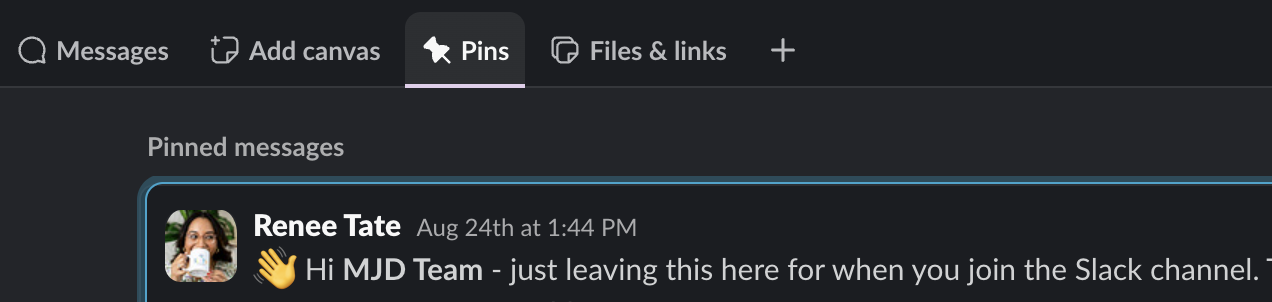
When you pin a message, it moves out of the busy feed and into a spot that doesn't scroll away. In Slack, it lands in the Pins tab at the top of the channel. In Asana, a pinned comment sits at the top of the task. Either way, it's one of the first things team members see when they open that space.
Here's what that does for your team:
It works as a gentle reminder. Even if someone doesn't act on it the first time they see it, the message is still there the next time they pop in. We all need a nudge now and then, especially with so much coming at us every day.
It stands out. A pinned message is set apart from everything else, so it's hard to miss.
It makes things easy to find. When someone says "I never saw that," you can say "It's pinned in the channel" and they know exactly where to look. You can even share a link straight to it.
I call this wayfinding. When your team always knows where to find the most important information, they stay on top of things without anyone having to chase them.
How to Pin in Slack
Pinning in the Slack app takes a few seconds. The steps look slightly different depending on your plan.
On desktop:
Hover over the message you want to pin.
Click the three dots (More actions).
On a free plan, choose Pin to channel. On paid plans, hover over Organize first, then choose Pin to channel.
In direct messages, the option says Pin to this conversation instead. It works the same way in a private channel or a public one.
On mobile: Press and hold the message, then tap Pin to channel.
With keyboard shortcuts: Click on a message (or use your arrow keys to land on it) and press P. Press P again to unpin it.
To find pinned items: Open the channel and click the Pins tab in the header, right under the channel name and next to the Messages tab. That's your pinned list for that conversation.
To share a pinned message: Hover over it, click the three dots, and choose Copy link. Paste that link anywhere, and it takes people right to it.
To unpin: Open the Pins tab, hover over the message, click the three dots, and choose Un-pin from channel.
How to Pin in Asana
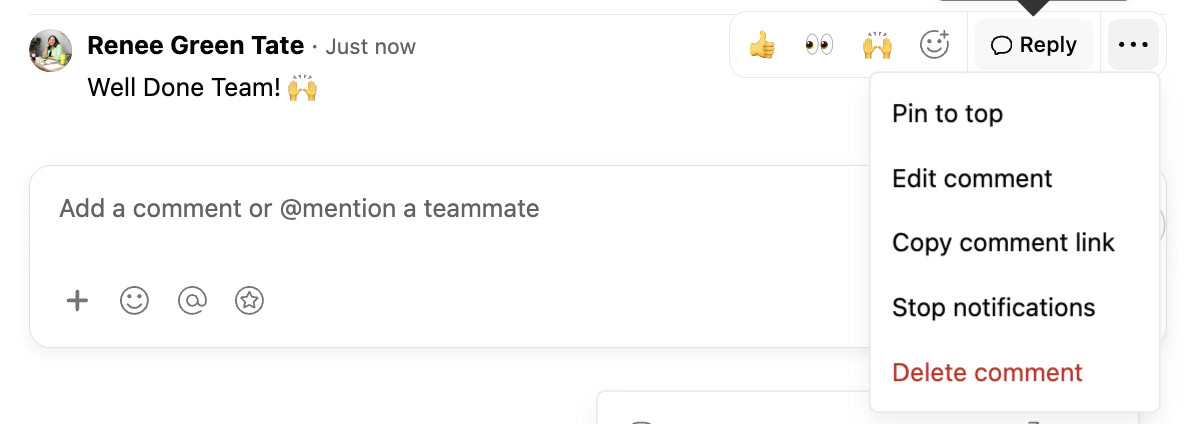
Asana lets you pin comments on tasks, which is a good way to keep key decisions attached to the work itself.
Open the task and scroll to the comments.
Hover over the comment you want to keep visible.
Click the pin icon (or the three dots, then Pin to top, depending on your layout).
The comment moves to the top of the task so anyone who opens it sees it first. Click the pin again to remove it.
What's Worth Pinning
Not everything should be pinned. If you pin it all, nothing stands out. Save pins for messages that are timely and that your whole team needs to act on or remember. A few examples:
A deadline change or a new launch date
A final decision after a long back and forth
Login steps or links your team uses every week
A client's feedback on a draft
Your weekly to-do lists or priorities for a project
When to Pin in Asana vs. Slack
Here's my honest take. Project messages belong in Asana, where the work is actually happening. If it's about a task, a deadline, or a deliverable, pin it on that task. Then the update lives right next to the work, and nobody has to search your Slack workspace to piece it together.
Culture and people updates belong in Slack. New hire welcomes, office closures, team wins, and birthday shout-outs are all perfect for a pinned message in a Slack channel.
So many of my clients worry that moving work talk into Asana will break their team culture. What I've seen is the opposite. When work stays where work happens and chatting stays where chatting happens, people feel more connected to each other.
Culture suffers when boundaries blur. You're in the team channel sharing about your new pottery class, and someone jumps in with "Hey, where are we on the Q4 report?" The fun moment is gone. Moving project updates out of busy Slack channels and into Asana task comments protects those boundaries for everyone.
Ready to Help Your Team Stay in the Loop
Pinning is a small habit, and it works best inside a clear system for where your team's work and conversations live. That's exactly what my project management services are built for. A Workflow Tune-Up gets one of your current Asana setups working the way you need it to. An Audit & Strategy session maps out how work and communication should flow between your tools. A Custom Build & Training sets up your whole system and teaches your team how to use it, so everyone knows where to look.